FlyBeeper mini BT
Manual
Control
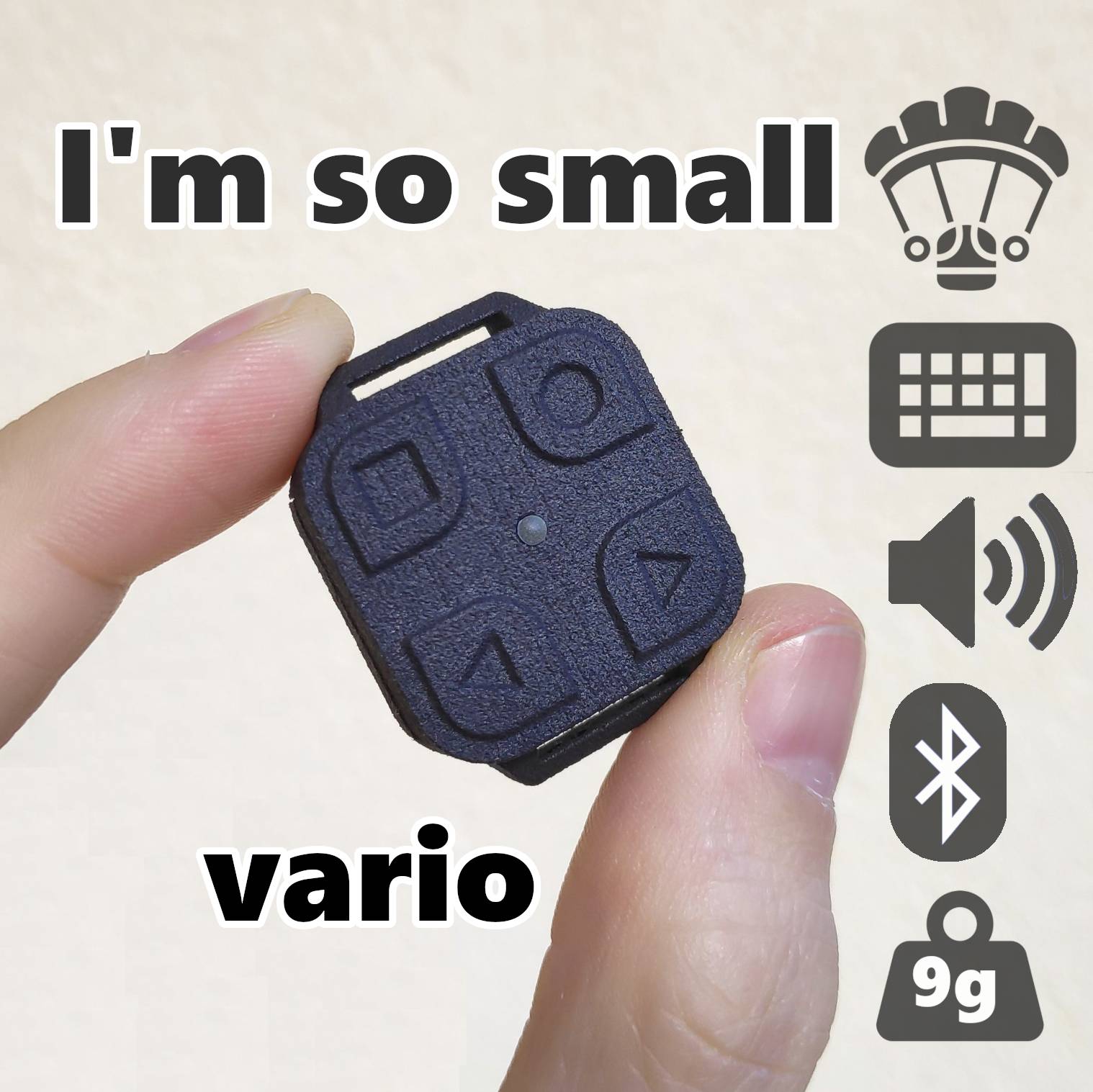
Power-on procedure: single click on the button with a circle, wait for the LED to flash, then press the button with a circle again and hold it until you hear a sound signal - the device is powered on.
Power-off procedure: press and hold the button with a circle until the LED stops flashing. After releasing the button, a power-off melody plays - the device is powered off.
Volume adjustment: when the device is on, press the “up” button to increase the volume or the “down” button to decrease the volume. Each press is accompanied by a sequence of tones. The number of tones indicates the volume level. The lowest level is silent. Important! If the device is paired with a smartphone via Bluetooth, this functionality does not work as the device switches to keyboard mode.
Operating Modes
The device operates in two modes. In normal mode, no constant Bluetooth connection is required to access barometer data and buttons. In HID keyboard mode, a connection with authentication and device pairing is required. In this mode, the device registers in the system as an external Bluetooth keyboard. The buttons are by default associated with the F1, F2, F3, and F4 keys. Important! In external keyboard mode, the on-screen keyboard will disappear in most Android applications. Button operation is possible in normal mode without pairing in some applications, such as maps.flybeeper.com. However, external keyboard mode is necessary for button operation in applications like xcTrack, xcSoar.
Pairing Procedure
Let’s go through the procedure using Android as an example. Turn on Bluetooth on Android and select FBminiBT from the list of available devices. Android will suggest the pairing process. Agree to it. A six-digit code will be displayed for pairing. On the device, press the button with a circle to accept or the button with a square to cancel pairing. Then press “Accept” on Android. Connection, disconnection, and pairing procedures are accompanied by sound signals. Important! After pairing, the buttons on the device no longer perform the volume control function. Only long pressing of the button with a circle to turn off the device works.
By default, an attempt to pair a variometer with a second device will fail. Therefore, starting from firmware version 0.12, removing the battery erases information about the paired device. This must be done in order to be able to pair the variometer with another device.
Settings
Use a device with a Bluetooth module — a smartphone, laptop, or PC. Click Connect and select FBminiBT from the list. Keep the devices as close to each other as possible. Change any setting and click Apply.
Silent on the ground - when activated, the device memorizes the current pressure. The vario sound is triggered based on the Buzzer Volume when the pressure changes by an amount roughly equivalent to a 1.5-meter change in altitude.
LED blink by vario - the LED starts blinking more frequently as the vertical speed increases, but not less than the Climb Tone On Threshold.
UART Protocol - text data transmission protocol for programs using the old UART emulation channel. POV and PRS are supported. It can be turned off if modern reading via the GATT ESS service is enabled.
Duplication pressure data via UART emulation - pressure data is transmitted through two BLE characteristics. The main characteristic is the ESS service. Reserve - emulation UART. If an application subscribes to both characteristics, then no data is sent through the UART emulation to avoid data duplication. However, some applications subscribe to all possible data transfer characteristics, but only use data from the UART emulation characteristic. For such programs, you must activate this option. The default is disabled.
Smooth frequency change - within the cycle, the sound frequency changes smoothly following the vario value, rather than being fixed at the beginning of the cycle.
Buzzer Volume - ringing volume from 0 - off to 3 - maximum.
Climb Tone On Threshold - speed at which the variometer sound is activated.
Climb Tone Off Threshold - speed at the boundary of transition from threshold mode to normal variometer mode. In threshold mode, from Climb Tone On Threshold to Climb Tone Off Threshold, a short low-frequency signal is added to the normal variometer sound.
Sink Tone Off Threshold - speed at which the variometer is activated in sink mode.
Sink Tone On Threshold - speed at the boundary of transition from threshold mode to normal variometer mode. In threshold mode, from Sink Tone On Threshold to Sink Tone Off Threshold, a short low-frequency signal is added to the normal variometer sound.
Vario averaging time - smoothing time constant in seconds. The higher, the smoother the vario change, but the higher the reaction delay to the rise. 0.1 sec by default is reactive. 1 sec for smoothness. Affects only the sound and vario readings. Does not affect the pressure readings.
End of climb hysteresis - the difference between the response set point at the beginning of the climb and the set point at the end of the climb. Allows to quickly turn off the sound when the climb ends. 0.2 m/s by default.
Adaptation of the internal vario frequency - the frequency of the sound adapted within the vario cycle instead of being fixed at the start of the cycle. Just makes the sound similar to other variometers. Off by default.
Vario, Frequency, Cycle, Duty - a table describing curves of frequency (Hz), period (ms), and duty (%) dependence on vertical speed (cm/s).
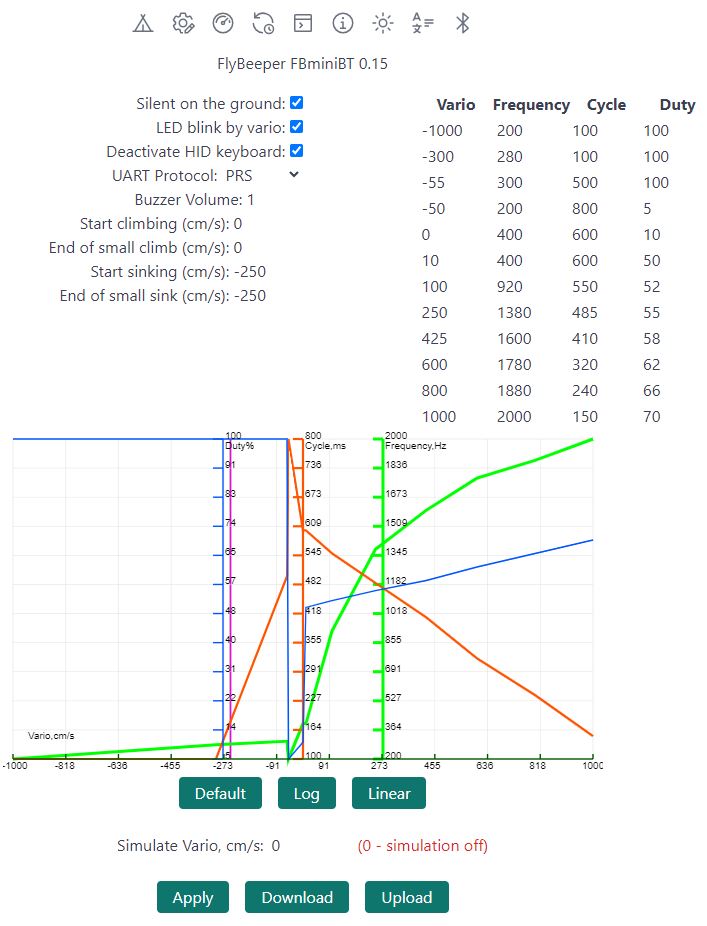
In the lower part of the configurator, in the Simulate Vario field, you can enter any variometer value and hear how the device will sound at a given vertical speed. All values are entered in cm/s.
List of Flight Programs with Direct Support
- xcTrack v.0.9.11.10+
- SeeYou Navigator v.3.0.6+
- LK8000 v.7.4.19+
- Flyskyhy v.8.2+
- TheFlightVario XC 2.38+
- FlyMe
- maps.flybeeper.com
Soon:
- Flygaggle
Communication Protocol Description
This section is intended more for developers than for regular users.
The device operates using the BLE protocol without pairing and authorization. Changes to each parameter are available via subscription (descriptor 0x2902). All non-standard parameters have 128-bit UUIDs, descriptor 0x2901 with a textual parameter name, and descriptor 0x2904 with a description of the format, exponent, and unit of measurement. For convenience, their values are listed in the tables below.
Characteristics UUID for service 0x181A ESS
| Name | UUID | Size | Exponent | Unit |
|---|---|---|---|---|
| Temperature | 0x2a6e | INT16 | -2 | Celcius |
| Pressure | 0x2a6d | UINT32 | -1 | Pascal |
Characteristics UUID for service 0x1819 LNS
| Name | UUID | Size | Exponent | Unit |
|---|---|---|---|---|
| Vario by pressure | b4df8385-16d2-4037-b2ed-2e14e1f4fa27 | INT16 | -2 | m/s |
Characteristics UUID of the service 0x1815 AIOS. The device has 4 buttons. This is defined in descriptor 0x2909 Number of Digitals. Each two bits represent the state of one button starting from the least significant bit. 0b00000001 means button 1 is pressed; if all buttons are pressed simultaneously, the value will be 0b01010101. This means the entire array fits in one byte. Only the states 0b00 (released) and 0b01 (pressed) are used. For more information about the states, see the Automation IO Service 1.0 Specification (section 3.1.1). Notifications are sent on change, meaning a separate notification for pressing and releasing a button. This allows for detecting long clicks, double clicks, and simultaneous holding of multiple buttons.
| Name | UUID | Size |
|---|---|---|
| Buttons | 0x2A56 | UINT8 array |
Characteristics UUID for service 0x180F BAS
| Name | UUID | Size | Exponent | Unit |
|---|---|---|---|---|
| Battery level | 0x2a19 | UINT8 | 0 | Percent |
| Battery voltage | b0c889e8-16d2-45ef-b615-387f6bca2370 | INT16 | -3 | Volt |
Characteristics UUID for service 0x180A DevInfo
| Name | UUID | Size | Value |
|---|---|---|---|
| Model Number | 0x2A24 | STRING | FBminiBT |
| Manufacturer Name | 0x2A29 | STRING | FlyBeeper |
| Firmware Revision | 0x2A26 | STRING | 0.01 |