FlyBeeper FANET
Manual
Control
Power On Procedure: Press the button, wait for the LED near the button to flash. After 2 seconds, a second flash indicates that the device is on. This is the main operating mode for the entire season. The standby power consumption is minimal, allowing the device to remain on for months. If the device is already on, pressing the button will reset the current Bluetooth connection, if it existed, and activate frequent Bluetooth advertising packets for 2 minutes, making it easier to connect to the device. After 2 minutes, the frequency of these packets decreases. Connection is still possible but will take longer.
Power Off Procedure (Transport Mode): Press the button, wait for the LED to flash. Press again within 2 seconds until the second flash. If there is no second flash, the device is off. This mode is used for transportation and long-term storage. In this mode, the device does not emit any radio signals and has minimal power consumption.
Placement
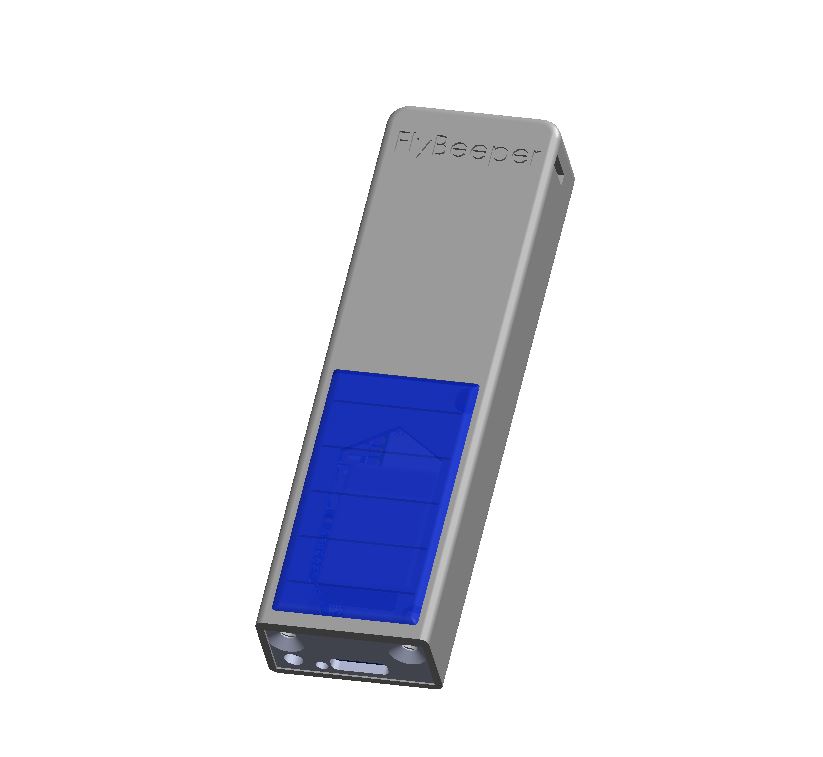
The device should be mounted vertically. The solar panel’s power is ample, so there are no specific requirements for its orientation. The antenna is located in the upper half of the housing above the solar panel. Its radiation pattern maximizes power in a direction perpendicular to the plane of the solar panel, with less power to the sides and minimal power up and down. For maximum antenna efficiency, ensure a gap between the upper half of the device and other devices.
When mounting on a cockpit, it is not necessary for the upper part of the device to protrude beyond the cockpit. Cockpits are usually made of radio-transparent fabric and do not hinder the device’s operation.
Charging
The device features a USB Type C port and a solar panel.
USB Charging: Supports most basic chargers except Power Delivery. The charging current is no more than 500 mA.
Solar Panel Charging: Provides a current of up to 20 mA. The operating time in this mode, under normal use, is limited only by the lifespan of the components.
Bluetooth Connection and Disconnection
The device must be turned on, i.e., not in transport mode. Pairing through the operating system is not required for connection. The device is controlled via Bluetooth by an external application. Simply launch the supported application and scan for Bluetooth devices around to find the device named FBFANET. Keep the devices as close to each other as possible. If you detect multiple FBFANET devices, select the one with the highest signal strength. To speed up the search, press the button on the device once - this will start a two-minute mode with a high frequency of advertising packet transmission.
The device will automatically disconnect when exiting the application and switch to standby mode for the next connection session.
List of flight apps
- LK8000 v.7.4.19+: Read and send FANET packets. Location, weather stations.
- xcTrack v.0.9.11.10+: supports reading texts via the FNNGB protocol. Implementation of direct reading and sending data in progress.
- SeeYou Navigator v.3.0.6+: supports reading texts via the FBFAN protocol. Implementation of direct reading and writing is possible only through users contacting Naviter technical support.
Explanation: If the program supports read by text protocol FNNGB, FBFAN or FNF, you will be able to see all FANET traffic without Internet connections on the map. But others pilots will not see you. To send your location, it is necessary for the developers of this application to implement this function using the information below.
Operating Modes
This section is intended more for developers than regular users.
The device operates in two modes - receiving and sending radio packets. The receiving mode is activated when you subscribe to notifications of the corresponding Bluetooth characteristic. The sending mode is activated when a byte array is written to the same characteristic. The size of the byte array for receiving or sending is limited to 40 bytes.
Service UUID: 0x1819
| Name | UUID | Size |
|---|---|---|
| RADIO_TX_RX | fec81438-cb89-4c37-93d0-badfced4376e | UINT8 array |
The device has a single-channel radio transmitter. This means it can either send or receive on one selected frequency at a time with current settings. However, an external application can change the frequency and provide alternating listening and transmission on different frequencies. This way, a multi-protocol mode can be implemented.
Characteristics UUID for service 0x180F BAS
| Name | UUID | Size | Exponent | Unit |
|---|---|---|---|---|
| Battery level | 0x2a19 | UINT8 | 0 | Percent |
| Battery voltage | b0c889e8-16d2-45ef-b615-387f6bca2370 | INT16 | -3 | Volt |
Characteristics UUID for service 6E400001-B5A3-F393-E0A9-E50E24DCCA9E Nordic UART. This service is added for compatibility and is not recommended for use in new developments due to its higher energy consumption.
| Name | UUID | Size |
|---|---|---|
| TX | 6E400003-B5A3-F393-E0A9-E50E24DCCA9E | UINT8 array |
If there is no subscription to the fec81438-cb89-4c37-93d0-badfced4376e characteristic of the 0x1819 service, strings in the FNNGB, FBFAN or FNF format will be written to TX depending on the fanet_uart_protocol settings.
Characteristics UUID for service 0x180A DevInfo
| Name | UUID | Size | Value |
|---|---|---|---|
| Model Number | 0x2A24 | STRING | FBFANET |
| Manufacturer Name | 0x2A29 | STRING | FlyBeeper |
| Firmware Revision | 0x2A26 | STRING | 0.01 |
Settings
Typically, all settings are managed by an external application — but you can also change them manually. You need a device with a Bluetooth module, such as a smartphone, laptop, or PC with Bluetooth. Click Connect and select FBFANET from the list. Keep the devices as close to each other as possible. Change any parameter and click Apply.
| Name | UUID | Size | Values |
|---|---|---|---|
| frequency | 8d8e8809-4697-41fc-8ee2-ca0b999354ec | UINT32 | 868200000* - EU, 920800000 - US, 866200000 - IN, 923200000 - KR (Hz) |
| bandwidth | f19422e2-982a-4954-9a75-b38927236a59 | INT8 | 1* — 250, 2 — 500 (kHz) |
| coding_rate | 17a95752-3c12-438f-9244-4f4612a1ab49 | INT8 | 1* — 4/5, 2 — 4/6, 3 — 4/7, 4 — 4/8 |
| datarate | 108b855f-11cd-4bc5-adee-eafce49bc77a | INT8 | 7* - SF_7, 8 - SF_8, 9 - SF_9, 10 - SF_10, 11 - SF_11, 12 - SF_12 |
| tx_power | 8ef0c42e-adb6-4897-b9c9-6fe93143faf4 | INT8 | -9 (min), 14*, 22 (max) (dBm) |
| fanet_uart_protocol | 9d9a9cd9-65ed-4d73-91ad-20cfdb5dbbba | INT8 | 1-FNNGB, 2-FBFAN, 3-FNF |
* - values by default